
Redeem Codes in Long Arm Toy Escape
Find the FREE! gift, type the string once, and ignore survey scams.
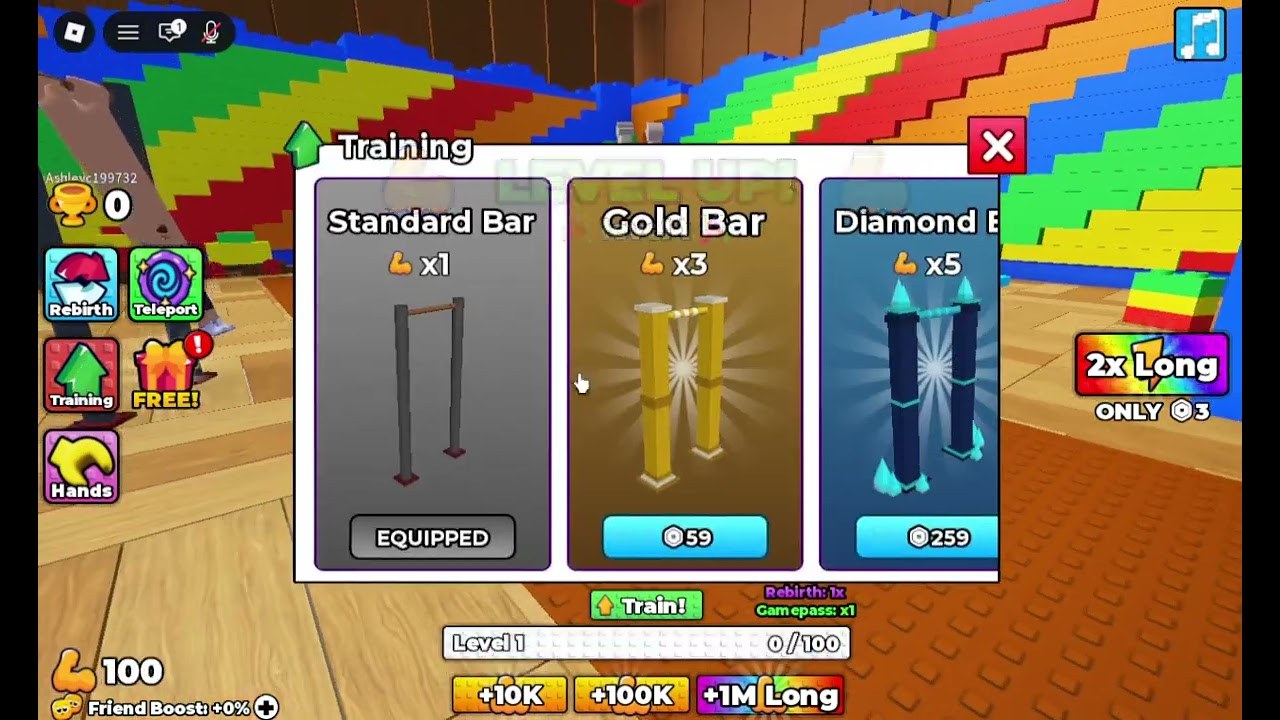
Redeeming a code in +1 Long Arm Toy Escape should take under a minute once you know which button is real. The experience does not use a Twitter bird on the official description. It uses a FREE! gift icon on the left rail of the HUD, sitting under Training and next to Hands. That is the same rail that holds Rebirth, Teleport, and the red-badge gift. If a website tells you to paste a code into Roblox.com settings, you are on the wrong screen.
This walkthrough assumes you already joined the live experience. If you have not spawned yet, read Getting Started first so you are not hunting menus during the tutorial stretch.
Step-by-step
- Spawn in the toy factory lobby. Wait until the left icons finish loading. On a slow phone the FREE! badge can appear a few seconds after Training.
- Tap FREE!. The icon is a gift box with a red notification pip when something is unclaimed.
- Look for a text field labeled Codes, Redeem, or Gift. Do not tap the paid +10K / +100K / +1M Long buttons at the bottom — those are Robux products, not codes.
- Type the string exactly as listed on the codes hub. Do not add spaces. Try the original case first; if it fails, try all caps, because some +1 games ignore case and some do not.
- Confirm. If it works you should see length, Wins, or an item pop on the HUD (flex icon, Wins, or a bar unlock).
- If it fails, screenshot the error and check where codes appear before you retry ten times. Repeat attempts can look like a bot to some games.
Desktop versus mobile
Desktop players already hold M1 to aim arms, so it is easy to click the world instead of the gift. Move the cursor to the left rail first, then click. Mobile players should use a thumb on the rail, not the same drag used to angle arms, or you will stretch into the water while the menu is open. Console players map the UI to the Roblox menu cursor — enable the on-screen pointer if the gift does not highlight.
Why a real code still fails
- Expired. Milestone codes in this genre die fast. We move them off the active table the same day.
- Already used. Most codes are one-time per account.
- Wrong game. Strings from Obby but you have long arms or Every Second Your Arm Gets Longer will not work here.
- Group gate. If Long Armers ever requires a join, open the group page and join before redeeming.
- New server. Rarely a code is patched onto new servers only. Rejoin after a patch.
What not to do
Do not enter your Roblox password on a “code generator.” Do not run a script that claims to auto-redeem. Do not pay for a Discord role that promises private codes — Long Armers can shout in the official group for free. The scripts safety page covers account risk; this page only covers the gift box.
After it works
A length dump is wasted if your rebirth still says 1x. Spend the extra Long on Training, then read training and rebirth before you prestige. If the code granted Wins, compare that to buying x2 Wins so you know whether the paid pass is still worth 89 Robux. Then get back to the factory run while the boost is hot.
Keep this page bookmarked next to the codes hub. When the first verified string lands, redeem it here in this order and ignore every lookalike title that shares the words “long arm.”
Frequently Asked Questions
Quick answers to the most common questions.
Where is the codes button?
On the left HUD rail: the FREE! gift under Training. It is not in Roblox Settings.
Are the +10K Long buttons codes?
No. Those bottom HUD buttons are Robux products. Codes go in the FREE! gift field.
The code says invalid. What now?
Check the codes hub status. If we still list it Active, rejoin a fresh server and confirm you are in this game, not a clone.
Can I redeem on mobile?
Yes. Tap FREE! with a separate tap, not the arm-aim drag, so you do not walk into water.